Computer Brush About
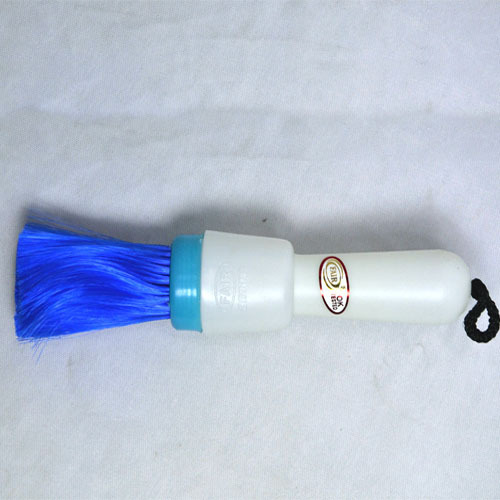
The upper narrow row of strong bristles easily gets between the keys on a computer keyboard or the buttons on a telephone etc. ... With the lower, wider and softer side you can remove dust from the monitor. This brush is also suitable for all other electronic devices.
Ergonomic & Durable DesignFeaturing an ergonomic non-slip handle, this computer cleaning brush delivers maximum comfort and control during use. Crafted with lightweight, high-grade plastic and resilient synthetic bristles, it ensures durability and long-term performance even with frequent cleaning routines.
Anti-Static, Gentle BristlesThe brush's soft, synthetic fiber bristles offer exceptional cleaning power while protecting sensitive electronic surfaces from scratches. Its anti-static properties make it safe for CPUs, keyboard components, and other electronic devices, minimizing the risk of static-related damage.
Multipurpose ApplicationDesigned for versatility, this brush handles various cleaning tasks both at home and in the office. Its dual brush head shapes target dust and particles on keyboards, CPUs, laptops, and other electronic equipment, ensuring a thorough yet gentle clean every time.
FAQ's of Computer Brush:
Q: How do I properly use the computer cleaning brush for best results?
A: Begin by gently sweeping the flat or rounded brush head over electronic surfaces such as keyboards or CPUs to remove dust and debris. For stubborn particles, use light, repeated strokes-there's no need for water or detergents, as the brush is formulated for dry cleaning.
Q: What makes this computer cleaning brush suitable for electronic devices?
A: This brush is equipped with soft, non-scratching synthetic bristles and anti-static properties, ensuring that it safely removes dust without damaging delicate electronic surfaces or causing unwanted static buildup.
Q: When should I clean my computer accessories with this brush?
A: It's recommended to clean your electronic devices as part of a regular maintenance routine, ideally weekly or whenever visible dust accumulates, to prolong device lifespan and maintain optimal performance.
Q: Where can this brush be used besides keyboards and CPUs?
A: This brush is also suitable for cleaning laptops, printers, monitors, and other home or office electronics, thanks to its gentle bristles and ergonomic design.
Q: What is the process for maintaining or washing the brush itself?
A: Rinse the bristles gently under lukewarm water if they become clogged with debris. Shake off excess water and allow it to air-dry thoroughly before the next use to ensure longevity and hygiene.
Q: What are the key benefits of using this computer cleaning brush regularly?
A: Routine use helps prevent the buildup of dust and dirt, reducing the risk of performance issues or overheating in your devices. Its reusable, washable nature makes it an economical and environmentally-friendly cleaning tool.

 Send Inquiry





 Send Inquiry


 Send Inquiry